PrecisionCalc
xl
Precision
Get Your Numbers Right
xlPrecision Revision History
| xlPrecision
2018 (December 26, 2017) |
| xlPrecision
3.1.7 & 2017b (September 8, 2017) |
| xlPrecision
2017 (November 5, 2016) |
|
Excel 2016 (November 20, 2015) |
|
Windows 10 (September 14, 2015) |
| xlPrecision
3.1.6 (March 17, 2014) |
|
Windows 8.1 (November 4, 2013) |
|
Excel 2013 (July 12, 2013) |
| xlPrecision
3.1.5 (May 26, 2013) |
| xlPrecision
3.1.4 (March 12, 2013) |
| xlPrecision
3.1.3 (January 27, 2013) |
|
Windows 8 (December 9, 2012) |
| xlPrecision
3.1.2 (September 10, 2012) |
| xlPrecision
3.1.1 (April 27, 2010) |
| xlPrecision
3.1b (April 17, 2010) |
|
Windows 7 (January 15, 2010) |
|
Excel 2010 (January 9, 2010) |
| xlPrecision
3.1 (January 4, 2010) |
|
xlPrecision 3.0.3 (November 15, 2009) |
| xlPrecision
3.0.2 (June 8, 2009) |
| xlPrecision
3.0.1 (May 15, 2009) |
| xlPrecision
3.0 (May 10, 2009) |
| xlPrecision
2.1.3 (April 24, 2009) |
| xlPrecision
2.1.2 (March 9, 2009) |
| xlPrecision
2.1.1 (September 17, 2007) |
| xlPrecision
2.1 (July 7, 2007) |
|
Excel 2007 and Windows Vista (May 31, 2007) |
|
xlPrecision 2.0.2 (February 21, 2006) |
|
xlPrecision 2.0.1 (January 10, 2006) |
| xlPrecision
2.0 (November 16, 2005) |
|
Excel 2003 (January 5, 2004) |
| xlPrecision 1.0 (July 8,
2003) |
What's New in
xlPrecision 2018?
December 26, 2017
xlPrecision
2018 adds worksheet function xlpISPRIME. Checks whether a number is
prime.
xlpISPRIME requires the 5,000 SD edition of
xlPrecision or higher.
xlPrecision 2018 also has all the features in
xlPrecision 2017b.
The Free Edition has not yet been updated to 2018.
Until then, unless xlPrecision 2018 is specifically requested, xlPrecision
3.1.7 will still be sent to customers who buy xlPrecision. This is in order
to avoid requiring an additional manual step during installation (xlPrecision
2017 requires a new xlPrecision.xla add-in file). Once the Free Edition has been
upgraded to xlPrecision 2018, paying customers will get xlPrecision 2018
automatically.
Upgrade!
xlPrecision 2018 is a free upgrade for owners of
xlPrecision 3.1.7 and 2017. Just let me know
you're interested.
If you own xlPrecision version 3.1.6 or earlier and want to
upgrade to version 2018, it's inexpensive and easy.
If you're upgrading to the same number of significant
digits, such as 1,500 SD or 32,767 SD, and to same edition (Expressor Research),
the price is exactly one half of the version 2017 price for that edition -- or
$25, whichever is less.
If you're also upgrading to a higher edition or to more
significant digits, just add the difference between the prices of the two
version 2018 editions.
To upgrade, simply paypal me at greglove@oz.net and
send me an email telling me that you paypalled me and what for. If you prefer
not to use paypal, just email me and we'll work something out to your
satisfaction. Let me know if you have any
questions.
Instead of paying for an upgrade,
you can get it for FREE! Here's
how.
What's New in
xlPrecision 3.1.7 and 2017b?
September 8, 2017
xlPrecision 3.1.7 and 2017b fix bugs in xlpCOS and
xlpACOS. When the input for xlpCOS was 0, or so close to 0 that for the maximum
significant digits in effect it would return the same result as 0, xlpCOS
returned 0 instead of 1. When the input for xlpACOS was within 0.000000000000001
of 0, 1, or -1, xlpACOS returned pi/2, 0, or pi respectively, as if the input
was exactly 0, 1, or -1.
What's New in
xlPrecision 2017?
November 5, 2016
xlPrecision
2017 adds seven new features:
- New worksheet function xlpMMULT. Same as Excel's
built-in MMULT (matrix multiplication), but with high precision.
- New worksheet function xlpMDETERM. Same as
Excel's built-in MDETERM (matrix determinant), but with high
precision.
- New worksheet function xlpBASECONV, for converting
numbers from one base to another while preserving high precision.
- Support for the Indian numbering system's digit
grouping, which unlike the International numbering system, groups every
two digits after the first group of three digits:
1,00,00,00,000.000001
Not only that, xlPrecision will use any
numbering system selected in the Windows Regional control panel
for Currency Digit Grouping.
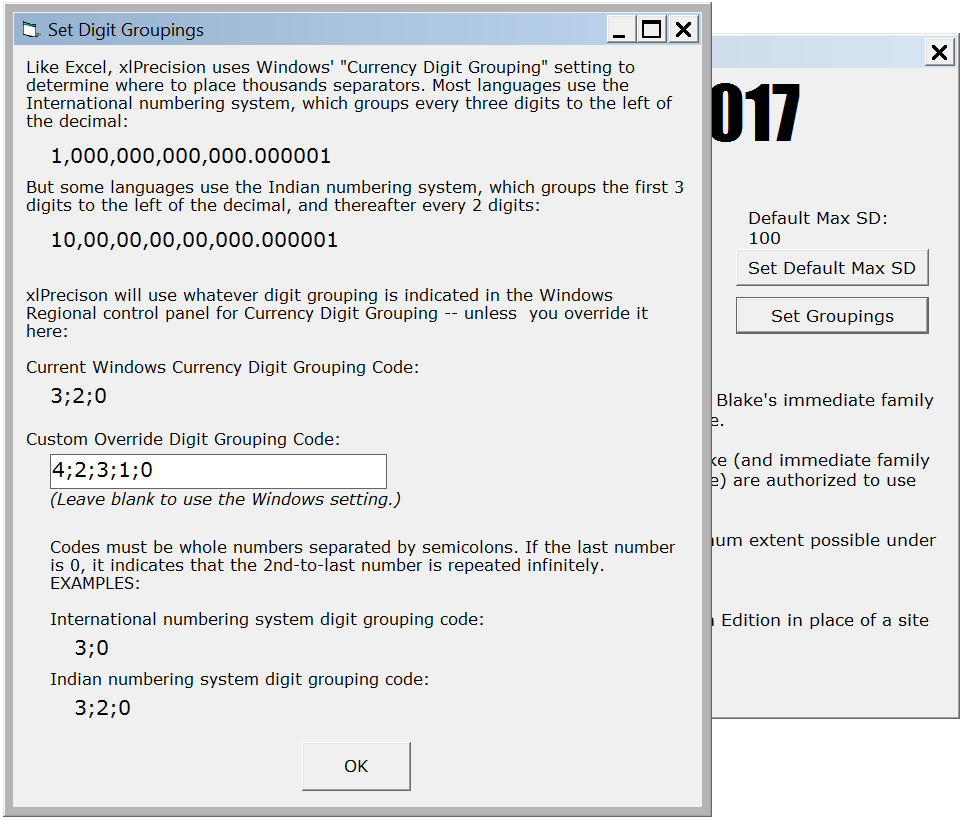
In fact, xlPrecision even allows you to
enter your own custom digit grouping code! You'll find it in
the About box by clicking the new "Set Groupings" button:
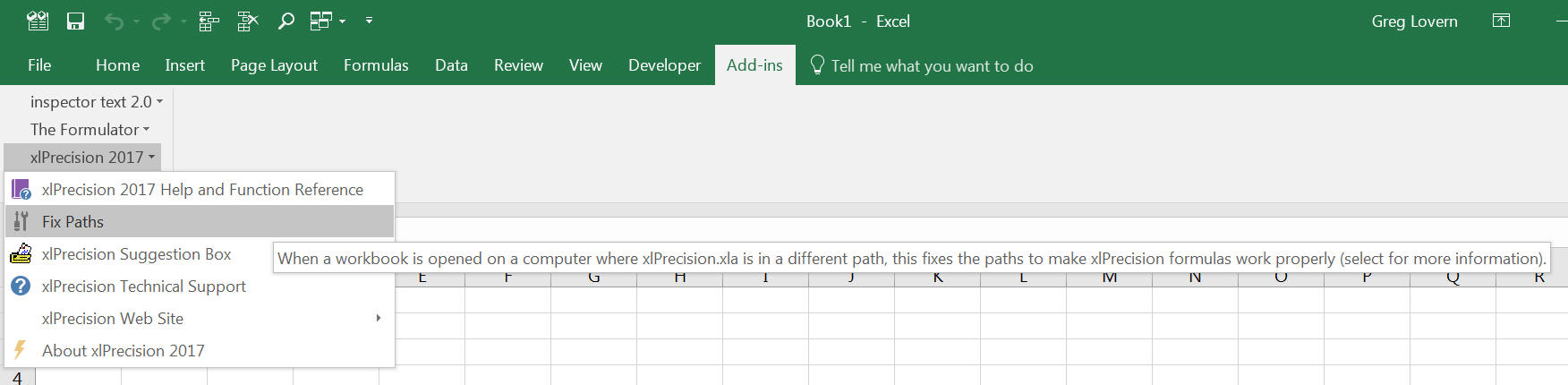
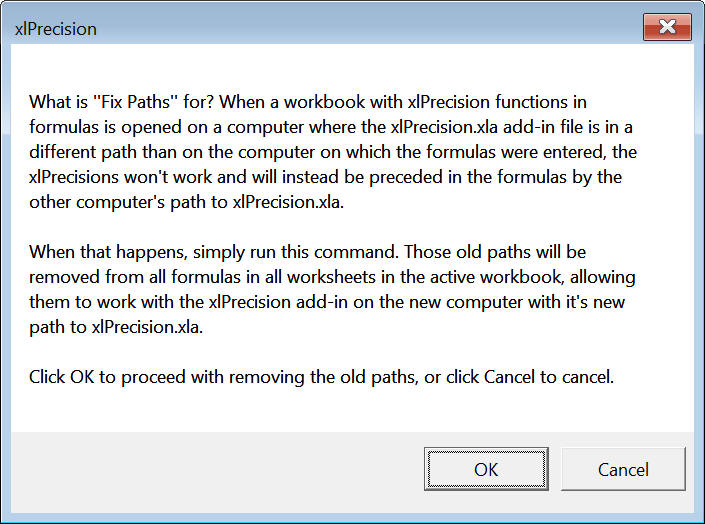
- New command on the xlPrecision menu, "Fix Paths". When a worksheet
with xlPrecision functions is opened on a computer where xlPrecision.xla is
in a different folder path, it fixes the paths in the formulas
to make those formulas work properly:
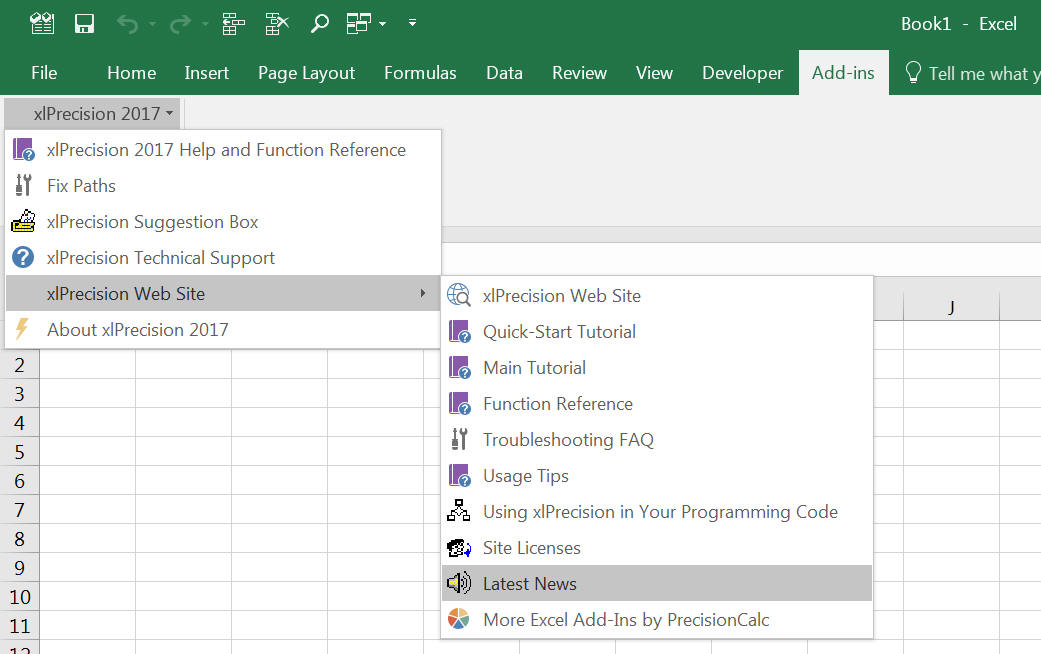
- Nine more links to the web site on the xlPrecision
menu:
-
New worksheet function xlpLISTSEP,
to identify the list separator character to use between function arguments,
which can vary by language and locale, and can be customized in a Windows
control panel. For English speakers it's normally the comma. For many others
it's normally the semicolon. But Windows allows setting it to any character.
This
function is for troubleshooting purposes, to check whether you're using
the correct list separator character between function arguments on your
computer.
xlpMMULT and xlpMDETERM were
privately commissioned, with the understanding that they would be added to the
publicly available versions of xlPrecision. If you want to privately commission
another new function to make it available in the short term, that service is
available on request.
The Free Edition has not yet been updated to 2017.
Until then, unless xlPrecision 2017 is specifically requested, xlPrecision
3.1.6 will still be sent to customers who buy xlPrecision. This is in order
to avoid requiring an additional manual step during installation (xlPrecision
2017 requires a new xlPrecision.xla file). Once the Free Edition has been
upgraded to xlPrecision 2017, paying customers will get xlPrecision 2017
automatically.
Upgrade!
If you own xlPrecision version 3.1.6 or
earlier and want
to upgrade to version 2017, it's inexpensive and easy.
If you're upgrading to the same number of
significant digits, such as 1,500 SD or 32,767 SD, and to same edition
(Express or Research),
the price is exactly one half of the version 2017 price for that edition --
or
$25, whichever is less.
If you're also upgrading to a higher
edition or to more significant digits, just add the difference between the
prices of the two version 2017 editions.
For example:
-
If you're upgrading from an earlier
1,500 SD Express edition to the version
2017, 1,500
Express edition, the price
is 1/2 of the version 2017 price, or $6.00.
-
If you're upgrading from an earlier
1,500 SD Express edition to the version
2017, 5,000 Research edition, the price is
1/2 of the version 2017 price of the equivalent edition from which you are
upgrading, or $6.00, plus the
difference between the equivalent version 2017 edition from which you are
upgrading and the version 2017
edition you're upgrading to. That difference is $16.00 ($28.00 - $12.00). So
the total price of that upgrade would be $6.00 + $16.00, or $24.00.
If that's confusing, just tell me what
edition you want to upgrade to and I'll figure out the upgrade price for you.
To upgrade, simply paypal me at
greglove@oz.net and send me an email
telling me that you paypalled me and what for. If you prefer not to use paypal,
just email me and we'll work something out to your satisfaction.
Instead of paying for an upgrade, you can
get it for FREE!
Here's how.
Has xlPrecision
been updated for
Excel 2016?
November 20, 2015
xlPrecision has been tested with Excel 2016 (32-bit). It worked perfectly, with no problems of any kind.
Although xlPrecision works with 32-bit Excel 2016, it is
not yet compatible with 64-bit Excel.
Has xlPrecision
been updated for Windows 10?
September 14, 2015
xlPrecision has been tested with Windows 10. It worked perfectly, with no problems
of any kind, so it is not necessary to update it for Windows 10. You can use xlPrecision
in Windows 10 with confidence.
What's New in
xlPrecision 3.1.6?
March 17, 2014
xlPrecision 3.1.6 adds the ability to change Max SD from
your VBA programming code. A read/write property named "MaxSD" has been added to
the xlPrecision object.
Has xlPrecision
been updated for Windows 8.1?
November 4, 2013
xlPrecision has been tested with Windows 8.1. It worked perfectly, with no problems
of any kind, so it is not necessary to update it for Windows 8.1. You can use xlPrecision
in Windows 8.1 with confidence.
Has xlPrecision
been updated for
Excel 2013?
July 12, 2013
xlPrecision has been tested with Excel 2013 (32-bit). It worked perfectly, with no problems of any kind.
Although xlPrecision works with 32-bit Excel 2013, it is
not yet compatible with 64-bit Excel.
What's New in
xlPrecision 3.1.5?
May 26, 2013
xlPrecision 3.1.5 fixes a problem in xlpROUNDUP and xlpROUNDDOWN.
In some cases they were not rounding to user's chosen SD; instead they were
returning up to edition's max SD.
What's New in
xlPrecision 3.1.4?
March 12, 2013
xlPrecision 3.1.4 fixes a problem in xlpLog with inputs
having more than 322 zeros to the right of the decimal.
What's New in
xlPrecision 3.1.3?
January 27, 2013
3.1.3 fixes a problem in xlpSQRT with 1.00000000000001,
also with more zeros than that between the ones.
Has xlPrecision
been updated for Windows 8?
December 9, 2012
xlPrecision has been tested with the final release
of Windows 8. It worked perfectly, with no problems
of any kind, so it is not necessary to update it for Windows 8. You can use xlPrecision
in Windows 8 with confidence.
What's New in
xlPrecision 3.1.2?
September 10, 2012
xlPrecision 3.1.2 fixes a problem in xlpLog with inputs
having more than 308 digits to the left of the decimal.
What's New in
xlPrecision 3.1.1?
April 27, 2010
xlPrecision 3.1.1 fixes a problem with xlpMOD with
inputs in exponential notation.
What's New in
xlPrecision 3.1b?
April 17, 2010
xlPrecision 3.1b fixes a setup problem when installing
on Windows XP and earlier.
The xlPrecision 3.1b Free Edition setup is backward
compatible with version 3.1 paid files. If you have a version 3.1 paid file, you
do not need a new paid file to work with the new version 3.1b Free
Edition setup.
Has xlPrecision
been updated for Windows 7?
January 15, 2010
xlPrecision has been tested with the final release
of Windows 7. It worked perfectly, with no problems
of any kind, so it is not necessary to update it for Windows 7. You can use xlPrecision
in Windows 7 with confidence.
Has xlPrecision
been updated for the
Excel 2010?
January 9, 2010
Microsoft has posted the Excel 2010 beta, and announced
that they expect to release it in June 2010. Excel 2010 is the first Excel
version to be available in both 32-bit and 64-bit versions. Betas for both
32-bit and 64-bit Excel 2010 were posted.
In the 32-bit version of Excel 2010,
xlPrecision worked perfectly, with no problems of any kind. You can use
xlPrecision in the 32-bit version of Excel 2010 with confidence.
However, xlPrecision does not currently work with the
64-bit version of the Excel 2010. xlPrecision will be updated to work
with the 64-bit version of Excel 2010 as soon as possible.
What's New in
xlPrecision 3.1?
January 4, 2010
- Faster calculation speed:
- Division calculation speed is improved in xlPrecision
3.1. The improvement varies with the lengths of the divisor, dividend, and
quotient, but for most scenarios it is about
10 - 15 TIMES faster.
Of course, all other xlPrecision functions that use
division (which is most of them) benefit from this improvement, too, to
varying degrees depending on how much they use division.
- Multiplication calculation speed is improved in xlPrecision 3.1.
The longer the multiplication product, the greater the improvement. With a
400,000-digit product, it's about 18 times faster. With a 32,000-digit product,
it's about 10 times faster. With a 1,000-digit product, it's about 40% faster.
With a 100-digit product, it's about 10% faster.
Of course, all other xlPrecision functions that use
multiplication (which is most of them) benefit from this improvement, too, to
varying degrees depending on how much they use multiplication.
- xlPrecision 3.1 adds the
format_decimal_place
parameter to several xlPrecision functions, allowing you to easily specify
that you want digits to always appear exactly out to whatever decimal
position you specify. So instead of a list of xlPrecision results that looks like this,
with varying numbes of decimal places:
| 123.45 |
| 12.34567 |
| 1,923.68 |
| 12,569 |
You can instead easily make the results look like this,
all with exactly the same number of decimal places:
| 123.45 |
| 12.35 |
| 1,923.68 |
| 12,569.00 |
Or like this, in this case with exactly four decimal
places:
| 123.4500 |
| 12.3457 |
| 1,923.6800 |
| 12,569.0000 |
Like Excel's number formatting,
format_decimal_place rounds
to the nearest. For example:
- If you specify formatting the number "9.876" to 2
decimal places, it rounds it to "9.88".
- If you specify formatting the number "9.99" to 1
decimal place, it rounds it to "10.0". This is exactly what Excel's number
formatting does.
The new
format_decimal_place parameter is available
on the following xlPrecision functions:
xlpADD
xlpSUBTRACT
xlpMULTIPLY
xlpDIVIDE
xlpROOT
xlpPOWER
xlpFORMAT (xlpFORMAT
is a new function. More on that below.)
In future versions,
format_decimal_place will be
available on more xlPrecision functions. Until then, you can use the new
xlpFORMAT function to pad zeros to any result of any xlPrecision function, or to
any number formatted in Excel as Text.
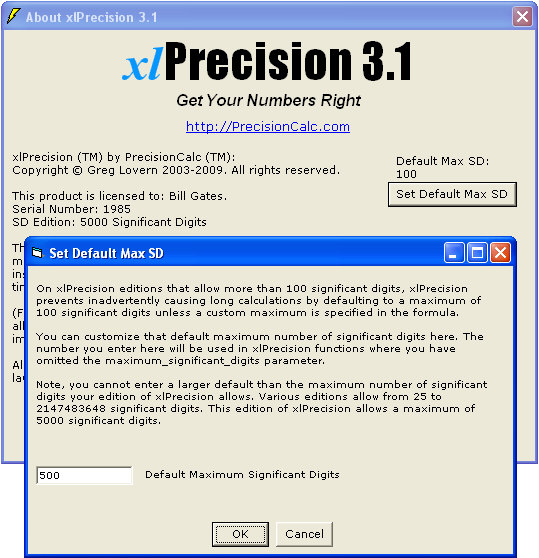
- Customize the default maximum significant digits:
On editions that allow more than 100 significant digits,
xlPrecision prevents inadvertently causing long calculations by defaulting to
100 significant digits unless a custom maximum is specified in the function's
maximum_significant_digits parameter. Now, version 3.1 allows you to customize
that default from 100 to any number you wish.
Version 3.1 also adds the new
xlpDEFAULTMAXSD function,
which allows you to determine the default maximum significant digits currently
in effect.
- xlpFORMAT:
- Free Edition:
- The Free Edition now has 3,000 significant Digits, up
from 500 in version 3.0.
Version 3.1 is a free upgrade
on request for xlPrecision 3.x owners.
For information about upgrading from versions 1 and 2, see
What's New in xlPrecision 3.1
What's New in
xlPrecision 3.0.3?
November 15, 2009
xlPrecision 3.0.3 fixes an internationalization bug that
caused some xlPrecision functions to return the error "#VALUE!" for some input
values in locales where the decimal symbol is not a period (".").
Version 3.0.3 is a free upgrade for version 3.0.x users on
request.
What's New in
xlPrecision 3.0.2?
June 8, 2009
xlPrecision 3.0.2 fixes a bug in xlpROUND that caused
incorrect thousands separator and scientific notation formatting in certain
circumstances.
Version 3.0.2 is a free upgrade for version 3.0.x users on
request.
What's New in
xlPrecision 3.0.1?
May 15, 2009
xlPrecision 3.0.1 fixes a bug where if Excel was started
by opening an Excel workbook that has a file-open password, xlPrecision returned
error 50290. This bug was never reported by an xlPrecision user.
Version 3.0.1 is a free upgrade for version 3.0 users on
request.
What's New in xlPrecision 3.0?
May 10, 2009
xlPrecision 3.0 adds three new functions:
xlPrecision 3.0 also adds xlpXLA,
for getting the version of the xlPrecision.xla file.
xlPrecision 3.0 also makes the Free
Edition easier to use. For example:
- The Free Edition's pop-up windows now happen only every
third calculation, down from every calculation in version 2.0.
- The Free Edition's pop-up windows now prompt for text
only every 15th calculation, down from every fifth calculation in version 2.0.
- Free Edition pop-up windows that prompt for text (every
15th calculation) reach a maximum of only 12 characters, down from 25 in
version 2.0. They still start at 3 characters.
- The text on the Free Edition's pop-up windows is now
easier to read.
- The Free Edition now has 500 significant digits, up
from 150 in version 2.0.
xlpLOG was privately commissioned, scheduling it ahead
of calculation performance improvements that were in progress, with the
understanding that it would be added to the publicly available versions of xlPrecision. If you want to privately
commission another new function to make it available in the short term, that
service is available on request.
Upgrade!
If you own xlPrecision version 1.x or 2.x and want
to upgrade to version 3.0, it's inexpensive and easy.
If you're upgrading to the same number of
significant digits, such as 1,500 SD or 32,767 SD, and to same edition
(Express or Research),
the price is exactly one half of the version 2.0 price for that edition --
or
$15, whichever is less.
If you're also upgrading to a higher
edition or to more significant digits, just add the difference between the
prices of the two version 3.0 editions.
For example:
-
If you're upgrading from an earlier
1,500 SD Express edition to the version 3.0, 1,500
Express edition, the price
is 1/2 of the version 3.0 price, or $6.00.
-
If you're upgrading from an earlier
1,500 SD Express edition to the version
3.0, 5,000 Research edition, the price is
1/2 of the version 3.0 price of the equivalent edition from which you are
upgrading, or $6.00, plus the
difference between the equivalent version 3.0 edition from which you are
upgrading and the version 3.0
edition you're upgrading to. That difference is $16.00 ($28.00 - $12.00). So
the total price of that upgrade would be $6.00 + $16.00, or $24.00.
If that's confusing, just tell me what
edition you want to upgrade to and I'll figure out the upgrade price for you.
To upgrade, simply paypal me at
greglove@oz.net and send me an email
telling me that you paypalled me and what for. If you prefer not to use paypal,
just email me and we'll work something out to your satisfaction.
Instead of paying for an upgrade, you can
get it for FREE!
Here's how.
What's New in
xlPrecision 2.1.3?
April 24, 2009
xlPrecision 2.1.3 fixes a bug reported yesterday in the
xlpROUND function. In a certain tiny percent of
circumstances, it rounded down when it should have rounded up.
What's New in
xlPrecision 2.1.2?
March 9, 2009
xlPrecision 2.1.2 fixes a bug that affected Excel 2002. If
Excel 2002 was started by opening an Excel workbook that had macros (instead of
starting Excel directly, then opening the workbook from within Excel),
xlPrecision returned error 50290.
What's New in
xlPrecision 2.1.1?
September 17, 2007
xlPrecision 2.1 was inadvertently branched away from
version 2.0.2. Version 2.1.1 merges the changes made to 2.0.2 back into 2.1.x.
The only change for users is that the new xlpPOISSON function is now available
to customers of the 2,147,483,648 SD Edition.
What's New in
xlPrecision 2.1?
July 7, 2007
xlPrecision 2.1 adds high-precision Poisson, including both cumulative and
non-cumulative Poisson. The free edition will be updated to version 2.1 as
soon as I have time. xlpPOISSON works the same as Excel's POISSON
function, except that it adds optional arguments to allow specifying the number
of significant digits and specifying whether you want the return value to be in
scientific notation. In addition to the high-precision return value, the input
numbers (target_num and average_num) can also be high-precision numbers if
desired.
xlpPOISSON was privately commissioned, with the
understanding that it would be added to the publicly available versions of xlPrecision. If you want to privately
commission another new function to make it available in the short term, that
service is available on request.
Has xlPrecision
been updated for
Excel 2007 and Windows Vista?
May 31, 2007
xlPrecision has been tested with the final release
versions of Excel 2007 and Windows Vista. It worked perfectly, with no problems
of any kind, so it was not necessary to update it. You can use xlPrecision with
Excel 2007 and Windows Vista with confidence.
What's New in xlPrecision 2.0.2?
February 21, 2006
xlPrecision 2.0.2 adds the new 2,147,483,648 SD Edition.
What's New in xlPrecision 2.0.1?
January 10, 2006
xlPrecision 2.0.1 fixes a bug where certain non-integer
roots and non-integer powers in xlpROOT and xlpPOWER could cause Excel to hang,
due to an infinite loop.
What's New in xlPrecision 2.0?
November 16, 2005
xlPrecision 2.0 offers more than 10 times as many
powerful features as version 1. If you liked xlPrecision before, you'll love it
now!
66 New Functions!
For a complete list of
functions, see the
Function Reference.
All are new in version 2.0 except xlpADD, xlpSUBTRACT,
xlpMULTIPLY, xlpDIVIDE, xlpSUM, xlpVERSION, and xlpSD_EDITION.
Much Faster
Multiplication
Division is faster too, because division
calls into multiplication.
Exponential Notation
Version 1.0
functions accepted numbers in exponential notation as arguments. But
now, version 2.0 functions can also return their results in
exponential notation.
Data Control &
Analysis Features
In addition to high precision, xlPrecision 2.0 offers many features that
empower you to go beyond
Excel's capabilities in other ways. Save valuable time with xlPrecision's
powerful Excluder functions. View your sorted data at a glance with the
exceptional sorting function. Take control of your fractional data with the
versatile fraction reducer. See
Data Control & Analysis Features.
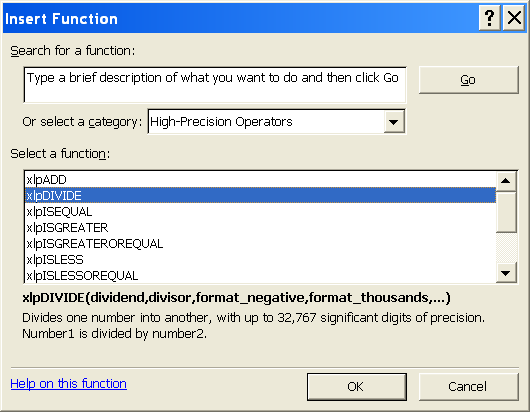
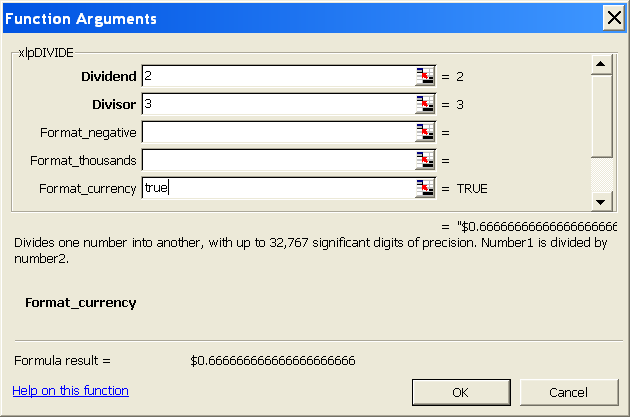
Help Text in Excel's Insert Function
Dialog
Use Excel's Insert Function dialog to insert xlPrecision
functions more conveniently than typing them in directly. See the
Quick-Start Tutorial.
Defaults to 100
Significant Digits
On editions that allow more than 100
significant digits, xlPrecision prevents inadvertently causing long calculations by
defaulting to 100 significant digits unless more are specified in the formula.
Editions that do not allow more than 100 significant digits default to 5 less
than the maximum allowed.
More Automated Setup
& Uninstall
Setup detects all installed compatible versions of Microsoft
Excel (Excel 97 and later) and installs itself as
an add-in in all of them, so you don't have to do that manually in Excel's Add-Ins dialog.
Also looks for future versions of Excel,
and if those future versions record add-in installations in the same way as
Excel 2000, 2002, 2003, and 2007, it installs itself as an add-in in those future
versions, too.
The uninstall program removes all those
settings, so that if xlPrecision 2.0 is uninstalled, Excel doesn't display a
dialog saying that it can't find xlPrecision.
Has xlPrecision
been updated for Excel 2003?
January 5, 2004
xlPrecision has been tested with the final release
of Excel 2003. It worked perfectly, with no problems
of any kind, so it was not necessary to update it. You can use xlPrecision with
Excel 2003 with confidence.
xlPrecision
Home Page
PrecisionCalc Home Page